
Audio: Difference between revisions
imported>Mic92 m Mic92 moved page Audio HOWTO to Audio |
imported>Mic92 No edit summary |
||
| Line 16: | Line 16: | ||
Sometimes the pc-speaker is the default audio card for ALSA. You can make your real sound card default instead. For example, if your sound card is "hda-intel" then add | Sometimes the pc-speaker is the default audio card for ALSA. You can make your real sound card default instead. For example, if your sound card is "hda-intel" then add | ||
< | <syntaxHighlight lang="nix"> | ||
boot.extraModprobeConfig = '' | |||
options snd slots=snd-hda-intel | |||
''; | |||
</ | </syntaxHighlight> | ||
to your <code>/etc/nixos/configuration.nix</code>. | to your <code>/etc/nixos/configuration.nix</code>. | ||
Sometimes, we may want to disable one of intel cards. Here is how to disable first card, but enable the second one. | Sometimes, we may want to disable one of intel cards. Here is how to disable first card, but enable the second one. | ||
< | <syntaxHighlight lang="nix"> | ||
boot.extraModprobeConfig = '' | |||
options snd_hda_intel enable=0,1 | |||
''; | |||
</ | </syntaxHighlight> | ||
Alternatively you can ... | Alternatively you can ... | ||
| Line 36: | Line 36: | ||
edit <code>/etc/nixos/configuration.nix</code> and add "snd_pcsp" to <code>boot.blacklistedKernelModules</code> option: | edit <code>/etc/nixos/configuration.nix</code> and add "snd_pcsp" to <code>boot.blacklistedKernelModules</code> option: | ||
<syntaxHighlight lang="nix"> | |||
boot.blacklistedKernelModules = [ "snd_pcsp" ]; | |||
</syntaxHighlight> | |||
Now reboot and retry from the beginning (i.e. check that your real card is shown by alsamixer without using the 'S' key). | Now reboot and retry from the beginning (i.e. check that your real card is shown by alsamixer without using the 'S' key). | ||
| Line 72: | Line 74: | ||
Once you have found a setting that works, you can add it to your configuration file: | Once you have found a setting that works, you can add it to your configuration file: | ||
< | <syntaxHighlight lang="nix"> | ||
boot.extraModprobeConfig = '' | |||
options snd-hda-intel model=YOUR_MODEL | |||
''; | |||
</ | </syntaxHighlight> | ||
Much of this is taken from https://help.ubuntu.com/community/HdaIntelSoundHowto which also has additional tips. | Much of this is taken from https://help.ubuntu.com/community/HdaIntelSoundHowto which also has additional tips. | ||
| Line 83: | Line 85: | ||
In your config file: | In your config file: | ||
< | <syntaxHighlight lang="nix">hardware.pulseaudio.enable = true</syntaxHighlight> | ||
You can check if everything works by using pavucontrol to see the audio streams and to make sure that PulseAudio detects your audio hardware. | You can check if everything works by using pavucontrol to see the audio streams and to make sure that PulseAudio detects your audio hardware. | ||
| Line 90: | Line 92: | ||
You may need to add your users to the audio group: | You may need to add your users to the audio group: | ||
< | <syntaxHighlight lang="bash"> | ||
usermod -a -G audio myusername | |||
</ | </syntaxHighlight> | ||
If a user is not a member the audio group only a dummy device will appear in pavucontrol. | If a user is not a member the audio group only a dummy device will appear in pavucontrol. | ||
The following command should only show that pulseaudio (and nothing else) is using the sound devices, if you see something like "plugin-container" in the COMMAND column then something is definitely not right, perhaps you have a local ~/.asoundrc which overrides the global alsa settings?. | The following command should only show that pulseaudio (and nothing else) is using the sound devices, if you see something like "plugin-container" in the COMMAND column then something is definitely not right, perhaps you have a local ~/.asoundrc which overrides the global alsa settings?. | ||
< | <syntaxHighlight lang="bash"> | ||
$ lsof /dev/snd/* | |||
COMMAND PID USER FD TYPE DEVICE SIZE/OFF NODE NAME | |||
pulseaudi 14080 goibhniu 30u CHR 116,7 0t0 5169 /dev/snd/controlC0 | |||
pulseaudi 14080 goibhniu 37u CHR 116,7 0t0 5169 /dev/snd/controlC0 | |||
</ | </syntaxHighlight> | ||
=== Using JACK with PulseAudio === | === Using JACK with PulseAudio === | ||
| Line 151: | Line 153: | ||
https://github.com/musnix/musnix | https://github.com/musnix/musnix | ||
< | <syntaxHighlight lang="nix"> | ||
boot = { | |||
kernelModules = [ "snd-seq" "snd-rawmidi" ]; | |||
kernel.sysctl = { "vm.swappiness" = 10; "fs.inotify.max_user_watches" = 524288; }; | |||
kernelParams = [ "threadirq" ]; | |||
kernelPackages = let | |||
rtKernel = pkgs.linuxPackagesFor (pkgs.linux.override { | rtKernel = pkgs.linuxPackagesFor (pkgs.linux.override { | ||
extraConfig = '' | extraConfig = '' | ||
| Line 169: | Line 171: | ||
''; | ''; | ||
}) pkgs.linuxPackages; | }) pkgs.linuxPackages; | ||
in rtKernel; | |||
postBootCommands = '' | |||
echo 2048 > /sys/class/rtc/rtc0/max_user_freq | |||
echo 2048 > /proc/sys/dev/hpet/max-user-freq | |||
setpci -v -d *:* latency_timer=b0 | |||
setpci -v -s $00:1b.0 latency_timer=ff | |||
''; | |||
# The SOUND_CARD_PCI_ID can be obtained like so: | |||
# $ lspci ¦ grep -i audio | |||
}; | |||
powerManagement.cpuFreqGovernor = "performance"; | |||
fileSystems."/" = { options = "noatime errors=remount-ro"; }; | |||
security.pam.loginLimits = [ | |||
{ domain = "@audio"; item = "memlock"; type = "-"; value = "unlimited"; } | |||
{ domain = "@audio"; item = "rtprio"; type = "-"; value = "99"; } | |||
{ domain = "@audio"; item = "nofile"; type = "soft"; value = "99999"; } | |||
{ domain = "@audio"; item = "nofile"; type = "hard"; value = "99999"; } | |||
]; | |||
services = { | |||
udev = { | |||
packages = [ pkgs.ffado ]; # If you have a FireWire audio interface | |||
extraRules = '' | |||
KERNEL=="rtc0", GROUP="audio" | |||
KERNEL=="hpet", GROUP="audio" | |||
''; | |||
}; | }; | ||
cron.enable =false; | |||
}; | |||
shellInit = '' | |||
export VST_PATH=/nix/var/nix/profiles/default/lib/vst:/var/run/current-system/sw/lib/vst:~/.vst | |||
export LXVST_PATH=/nix/var/nix/profiles/default/lib/lxvst:/var/run/current-system/sw/lib/lxvst:~/.lxvst | |||
export LADSPA_PATH=/nix/var/nix/profiles/default/lib/ladspa:/var/run/current-system/sw/lib/ladspa:~/.ladspa | |||
export LV2_PATH=/nix/var/nix/profiles/default/lib/lv2:/var/run/current-system/sw/lib/lv2:~/.lv2 | |||
export DSSI_PATH=/nix/var/nix/profiles/default/lib/dssi:/var/run/current-system/sw/lib/dssi:~/.dssi | |||
''; | |||
users = { | |||
extraUsers.yourname= { | |||
extraGroups = [ "wheel" "audio" ]; | |||
}; | }; | ||
}; | |||
</ | </syntaxHighlight> | ||
Revision as of 07:35, 23 August 2017
Getting ALSA to work
- on a console fire up alsamixer
alsamixer
- you see plenty of vertical bars?
- you should be okay
- you see very few vertical bars and the sound card (top-left) is something like "PC Speaker"?
- hit the 'S' key, you should be able to switch to the "real" audio card (if not your audio card is likely to not being supported yet).
- when the real audio card is selected you should be viewing the "plenty vertical bars" thing.
- first thing to do is to disable pc speaker (kernel module "snd-pcsp", see below.
Make your audio card the default ALSA card
Sometimes the pc-speaker is the default audio card for ALSA. You can make your real sound card default instead. For example, if your sound card is "hda-intel" then add
boot.extraModprobeConfig = ''
  options snd slots=snd-hda-intel
'';
to your /etc/nixos/configuration.nix.
Sometimes, we may want to disable one of intel cards. Here is how to disable first card, but enable the second one.
boot.extraModprobeConfig = ''
  options snd_hda_intel enable=0,1
'';
Alternatively you can ...
Disable PC Speaker "audio card"
edit /etc/nixos/configuration.nix and add "snd_pcsp" to boot.blacklistedKernelModules option:
boot.blacklistedKernelModules = [ "snd_pcsp" ];
Now reboot and retry from the beginning (i.e. check that your real card is shown by alsamixer without using the 'S' key).
Other hardware specific problems
Some hardware specific problems can be resolved by adjusting the options for the sound module. For example, the microphone may be stuck on an unusably low volume. First you should be sure that you have already checked the settings in alsamixer to make sure nothing is muted, and also any physical buttons on your computer (I have twice overlooked the mute button on laptops!).
You should be able to look up the available options for model in models.rst. You can try them out interactively as follows:
- Close any applications using the sound card
- See if any applications are using the sound card
- $ lsof /dev/snd/*
- COMMAND PID USER FD TYPE DEVICE SIZE/OFF NODE NAME
- pulseaudi 14080 goibhniu 30u CHR 116,7 0t0 5169 /dev/snd/controlC0
- pulseaudi 14080 goibhniu 37u CHR 116,7 0t0 5169 /dev/snd/controlC0
- Kill them
- for any process apart from pulseaudio you could just do:
- $ kill -9 14080
- but in the case of pulseaudio you have to prevent it from respawning itself automatically
- $ mkdir -P ~/.config/pulse && echo "autospawn=no" >> ~/.config/pulse/client.conf
- you can then stop pulseaudio with:
- $ pulseaudio -k # or kill it by process id
- See if any applications are using the sound card
- Unload the snd-hda-intel module
- rmmod snd-hda-intel
- Find your model
- grep Codec /proc/asound/card0/codec*
- Look up the model options for your card
- Try each one
- modprobe snd-hda-intel model=3stack-6ch
- Test if this has fixed your problem (tip: aplay and arecord are alsa based command line tools you can use to quickly check)
- Repeat until you have exhausted all the options or have fixed your problem
- TIDY UP!
- Don't forget to re-enable pulse autospawning by changing "autospawn=no" to "autospawn=yes" in ~/.config/pulse/client.conf
Once you have found a setting that works, you can add it to your configuration file:
boot.extraModprobeConfig = ''
  options snd-hda-intel model=YOUR_MODEL
'';
Much of this is taken from https://help.ubuntu.com/community/HdaIntelSoundHowto which also has additional tips.
Enabling PulseAudio
In your config file:
hardware.pulseaudio.enable = true
You can check if everything works by using pavucontrol to see the audio streams and to make sure that PulseAudio detects your audio hardware.
Please ensure you have turned off the devices you do not want in the configuration section of pavucontrol.
You may need to add your users to the audio group:
usermod -a -G audio myusername
If a user is not a member the audio group only a dummy device will appear in pavucontrol.
The following command should only show that pulseaudio (and nothing else) is using the sound devices, if you see something like "plugin-container" in the COMMAND column then something is definitely not right, perhaps you have a local ~/.asoundrc which overrides the global alsa settings?.
$ lsof /dev/snd/*
COMMAND     PID     USER   FD   TYPE DEVICE SIZE/OFF NODE NAME
pulseaudi 14080 goibhniu   30u   CHR  116,7      0t0 5169 /dev/snd/controlC0
pulseaudi 14080 goibhniu   37u   CHR  116,7      0t0 5169 /dev/snd/controlC0
Using JACK with PulseAudio
The Jack Audio Connection Kit is used by most of the serious audio applications on Linux. It provides real-time, low latency connections for both audio and MIDI data between applications that implement its API. NixOS uses the dbus version of JACK2 (jackdbus). This can be used together with pulseaudio with a little configuration. The result is that you don't have to manually hunt down applications which are using the sound device and kill them before starting JACK. You can also continue to use non-JACK aware applications (e.g. flash) at the same time as using JACK applications (e.g. Ardour).
- Load the sequencer and midi kernel modules
- boot.kernelModules = [ "snd-seq" "snd-rawmidi" ];
- Enable JACK support
- In your configuration file:
hardware.pulseaudio.package = pkgs.pulseaudio.override { jackaudioSupport = true; };
- Ensure that the JACK enabled pulseaudio is being used
- ~/.config/pulse/client.conf
daemon-binary=/var/run/current-system/sw/bin/pulseaudio
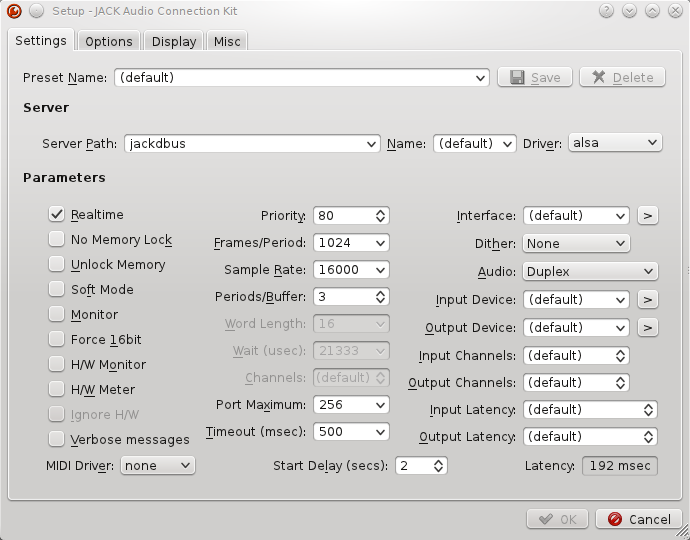
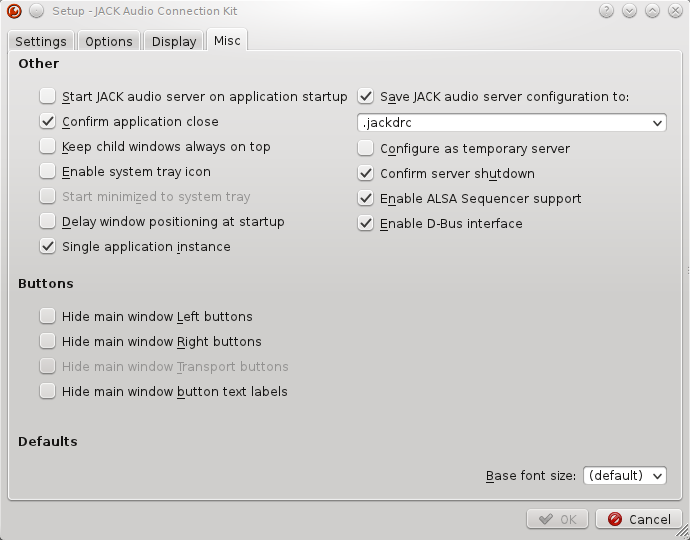
- Configure QjackCtl
- Enable jackdbus
- Setup -> Settings -> Server Path: jackdbus
- Setup -> Misc -> Enable D-Bus interface: check
- Load the jack modules for pulseaudio after starting jackdbus
- Setup -> Settings -> Options -> Execute script after Startup: check
pactl load-module module-jack-sink channels=2; pactl load-module module-jack-source channels=2; pacmd set-default-sink jack_out
- Setup -> Settings -> Options -> Execute script on Shutdown: check
pactl unload-module `pactl list|grep -A 3 jack-source|tail -1|awk '{ print $NF }'`;pactl unload-module `pactl list|grep -A 3 jack-sink|tail -1|awk '{ print $NF }'`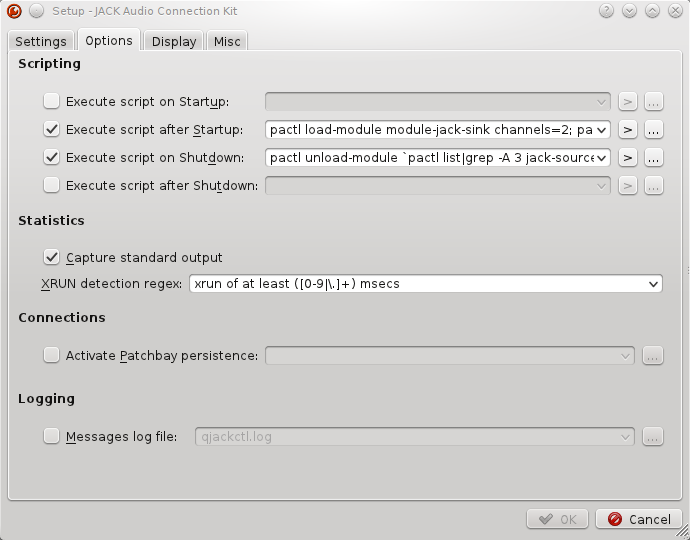
- Enable jackdbus


You should now be able to start JACK with QjackCtl, you will notice a new playback and capture device in your sound mixer along with your normal devices.

Troubleshooting JACK and PulseAudio
$ pactl load-module module-jack-sink channels=2
Failure: Module initalization failed
Check if you have previous settings in ~/.config/jack/conf.xml. Try renaming this file and running the pactl command again.
Otherwise, you may get further info by disabling PulseAudio respawning (see above) and starting it in verbose mode:
$ pulseaudio -vvv
System optimizations for low latency audio with JACK
Some of the following settings, documented in http://wiki.linuxmusicians.com/doku.php?id=system_configuration and https://wiki.archlinux.org/index.php/Pro_Audio can be very helpful to reduce xruns and improve responsiveness and are required for certain programs to run at all e.g. Ardour. The kernelPackages section was taken from https://github.com/rockfabrik/deployment/blob/master/modules/profiles/dj.nix#L32
An easy way of setting all of these, plus a true realtime kernel, is here: https://github.com/musnix/musnix
boot = {
  kernelModules = [ "snd-seq" "snd-rawmidi" ];
  kernel.sysctl = { "vm.swappiness" = 10; "fs.inotify.max_user_watches" = 524288; };
  kernelParams = [ "threadirq" ];
  kernelPackages = let
    rtKernel = pkgs.linuxPackagesFor (pkgs.linux.override {
      extraConfig = ''
        PREEMPT_RT_FULL? y
        PREEMPT y
        IOSCHED_DEADLINE y
        DEFAULT_DEADLINE y
        DEFAULT_IOSCHED "deadline"
        HPET_TIMER y
        CPU_FREQ n
        TREE_RCU_TRACE n
      '';
    }) pkgs.linuxPackages;
  in rtKernel;

  postBootCommands = ''
    echo 2048 > /sys/class/rtc/rtc0/max_user_freq
    echo 2048 > /proc/sys/dev/hpet/max-user-freq
    setpci -v -d *:* latency_timer=b0
    setpci -v -s $00:1b.0 latency_timer=ff
  '';
  # The SOUND_CARD_PCI_ID can be obtained like so:
  # $ lspci ¦ grep -i audio
};

powerManagement.cpuFreqGovernor = "performance";

fileSystems."/" = { options = "noatime errors=remount-ro"; };

security.pam.loginLimits = [
  { domain = "@audio"; item = "memlock"; type = "-"; value = "unlimited"; }
  { domain = "@audio"; item = "rtprio"; type = "-"; value = "99"; }
  { domain = "@audio"; item = "nofile"; type = "soft"; value = "99999"; }
  { domain = "@audio"; item = "nofile"; type = "hard"; value = "99999"; }
];

services = {
  udev = {
    packages = [ pkgs.ffado ]; # If you have a FireWire audio interface
    extraRules = ''
      KERNEL=="rtc0", GROUP="audio"
      KERNEL=="hpet", GROUP="audio"
    '';
  };
  cron.enable =false;
};

shellInit = ''
  export VST_PATH=/nix/var/nix/profiles/default/lib/vst:/var/run/current-system/sw/lib/vst:~/.vst
  export LXVST_PATH=/nix/var/nix/profiles/default/lib/lxvst:/var/run/current-system/sw/lib/lxvst:~/.lxvst
  export LADSPA_PATH=/nix/var/nix/profiles/default/lib/ladspa:/var/run/current-system/sw/lib/ladspa:~/.ladspa
  export LV2_PATH=/nix/var/nix/profiles/default/lib/lv2:/var/run/current-system/sw/lib/lv2:~/.lv2
  export DSSI_PATH=/nix/var/nix/profiles/default/lib/dssi:/var/run/current-system/sw/lib/dssi:~/.dssi
'';

users = {
  extraUsers.yourname= {
   extraGroups = [ "wheel" "audio" ];
  };
};