
GStreamer: Difference between revisions
m use syntaxhighlight console and "$" for the shell command |
m replace lang=nix with lang=console for shell commands |
||
| Line 33: | Line 33: | ||
To activate this environment in your terminal run | To activate this environment in your terminal run | ||
<syntaxhighlight lang= | <syntaxhighlight lang=console> | ||
$ nix develop | $ nix develop | ||
</syntaxhighlight> | </syntaxhighlight> | ||
| Line 40: | Line 40: | ||
== Test the installation == | == Test the installation == | ||
You can test that the <code>gst_all_1.gstreamer</code> tools are available by running a dummy pipeline | You can test that the <code>gst_all_1.gstreamer</code> tools are available by running a dummy pipeline | ||
<syntaxhighlight lang= | <syntaxhighlight lang=console> | ||
$ gst-launch-1.0 videotestsrc ! videoconvert ! autovideosink | $ gst-launch-1.0 videotestsrc ! videoconvert ! autovideosink | ||
</syntaxhighlight> | </syntaxhighlight> | ||
| Line 46: | Line 46: | ||
You can test that the plugins like from <code>gst_all_1.gst-plugins-base</code> are available to the higher level tools by inspecting such a base plugin like <code>filesrc</code> with | You can test that the plugins like from <code>gst_all_1.gst-plugins-base</code> are available to the higher level tools by inspecting such a base plugin like <code>filesrc</code> with | ||
<syntaxhighlight lang= | <syntaxhighlight lang=console> | ||
$ gst-inspect-1.0 filesrc | $ gst-inspect-1.0 filesrc | ||
Factory Details: | Factory Details: | ||
| Line 62: | Line 62: | ||
or by using it in a pipeline. Here, we could play a video from the local machine with | or by using it in a pipeline. Here, we could play a video from the local machine with | ||
<syntaxhighlight lang= | <syntaxhighlight lang=console> | ||
$ gst-launch-1.0 filesrc location=my_video.mp4 ! videoconvert ! autovideosink | $ gst-launch-1.0 filesrc location=my_video.mp4 ! videoconvert ! autovideosink | ||
</syntaxhighlight> | </syntaxhighlight> | ||
If the plugins are not correctly made available to the higher level tools, you'll get an error | If the plugins are not correctly made available to the higher level tools, you'll get an error | ||
<syntaxhighlight lang= | <syntaxhighlight lang=console> | ||
$ gst-inspect-1.0 filesrc | $ gst-inspect-1.0 filesrc | ||
No such element or plugin 'filesrc' | No such element or plugin 'filesrc' | ||
| Line 79: | Line 79: | ||
Adding the following export to your script, sets "gstreamer" and "gst-plugins-base" and "gst-plugins-good" paths. Similarly you can add any other "gst-plugins" package as well. | Adding the following export to your script, sets "gstreamer" and "gst-plugins-base" and "gst-plugins-good" paths. Similarly you can add any other "gst-plugins" package as well. | ||
<syntaxhighlight lang=" | <syntaxhighlight lang="bash"> | ||
export GST_PLUGIN_SYSTEM_PATH_1_0="${gst_all_1.gstreamer.out}/lib/gstreamer-1.0:${gst_all_1.gst-plugins-base}/lib/gstreamer-1.0:${gst_all_1.gst-plugins-good}/lib/gstreamer-1.0" | export GST_PLUGIN_SYSTEM_PATH_1_0="${gst_all_1.gstreamer.out}/lib/gstreamer-1.0:${gst_all_1.gst-plugins-base}/lib/gstreamer-1.0:${gst_all_1.gst-plugins-good}/lib/gstreamer-1.0" | ||
</syntaxhighlight>Note: "gstreamer.out" is the derivative that contains "/lib" directory for that package. | </syntaxhighlight>Note: "gstreamer.out" is the derivative that contains "/lib" directory for that package. | ||
Latest revision as of 13:56, 19 July 2026
GStreamer is a popular multimedia framework to handle a variety of video and audio formats on different platforms in a uniform way through a powerful and convenient API in order to build multimedia apps, video/audio editors and streaming services. It consists of a huge amount low-level plugins like "videotestsrc", "videoconvert" and "autovideosink" as well as a few higher level test-and-combine framework tools like "gst-inspect", "gst-launch" etc.
Installing via nixpkgs
In Nix as in other Linux distributions those tools and plugins are split into separate packages, which you can bring together with a custom Nix shell environment:
{
  description = "A GStreamer development flake";

  outputs = { self, nixpkgs }:
    let
      system = "x86_64-linux";
      pkgs = nixpkgs.legacyPackages.${system};
    in {
      devShells.${system}.default = pkgs.mkShell {
        buildInputs = with pkgs; [
          # Video/Audio data composition framework tools like "gst-inspect", "gst-launch" ...
          gst_all_1.gstreamer
          # Common plugins like "filesrc" to combine within e.g. gst-launch
          gst_all_1.gst-plugins-base
          # Specialized plugins separated by quality
          gst_all_1.gst-plugins-good
          gst_all_1.gst-plugins-bad
          gst_all_1.gst-plugins-ugly
          # Plugins to reuse ffmpeg to play almost every video format
          gst_all_1.gst-libav
          # Support the Video Audio (Hardware) Acceleration API
          gst_all_1.gst-vaapi
          #...
        ];
      };
    };
}
To activate this environment in your terminal run
$ nix develop
You can find all available Nix package names through the Nix search page.
Test the installation
You can test that the gst_all_1.gstreamer tools are available by running a dummy pipeline
$ gst-launch-1.0 videotestsrc ! videoconvert ! autovideosink
which should open a colored video window.
You can test that the plugins like from gst_all_1.gst-plugins-base are available to the higher level tools by inspecting such a base plugin like filesrc with
$ gst-inspect-1.0 filesrc
Factory Details:
  ...
  Long-name                File Source
  Description              Read from arbitrary point in a file
  ...
Plugin Details:
  Name                     coreelements
  Description              GStreamer core elements
  Filename                 /nix/store/p39g1.../libgstcoreelements.so
  ...
or by using it in a pipeline. Here, we could play a video from the local machine with
$ gst-launch-1.0 filesrc location=my_video.mp4 ! videoconvert ! autovideosink
If the plugins are not correctly made available to the higher level tools, you'll get an error
$ gst-inspect-1.0 filesrc
No such element or plugin 'filesrc'
Troubleshooting
erroneous pipeline: no element "filesrc"
In some cases while creating a shell using "mkShell" or "writeShellApplication" just setting the "runtimeInputs" is not enough. It's necessary to manually set the "GST_PLUGIN_SYSTEM_PATH_1_0" environment variable.[1]
Adding the following export to your script, sets "gstreamer" and "gst-plugins-base" and "gst-plugins-good" paths. Similarly you can add any other "gst-plugins" package as well.
export GST_PLUGIN_SYSTEM_PATH_1_0="${gst_all_1.gstreamer.out}/lib/gstreamer-1.0:${gst_all_1.gst-plugins-base}/lib/gstreamer-1.0:${gst_all_1.gst-plugins-good}/lib/gstreamer-1.0"
Note: "gstreamer.out" is the derivative that contains "/lib" directory for that package.
nautilus: "Your GStreamer installation is missing a plug-in."

To fix the issue I found the following solutions:
- Using
nix-shell:
$ nix-shell -p gst_all_1.gstreamer gst_all_1.gst-plugins-base gst_all_1.gst-plugins-good gst_all_1.gst-plugins-bad gst_all_1.gst-plugins-ugly gst_all_1.gst-libav gst_all_1.gst-vaapi --run "nautilus"
- Using the environment variable "
GST_PLUGIN_PATH":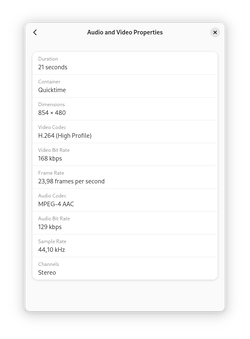
"Audio and Video Properties" of "Properties" window of nautilus after fix ❄︎ /etc/nixos/configuration.nix{ config, pkgs, ... }: { environment.systemPackages = with pkgs; [ gst_all_1.gstreamer gst_all_1.gst-plugins-base gst_all_1.gst-plugins-good gst_all_1.gst-plugins-bad gst_all_1.gst-plugins-ugly gst_all_1.gst-libav gst_all_1.gst-vaapi ]; environment.variables = { GST_PLUGIN_PATH = "/run/current-system/sw/lib/gstreamer-1.0/"; }; }

$ nixos-rebuild boot --sudo
$ systemctl reboot