
User Environment: Difference between revisions
imported>Nix m →Environment variables: trim for width |
m →Environment variables: use syntaxhighlight console and "$" for the shell command sample |
||
| (2 intermediate revisions by 2 users not shown) | |||
| Line 1: | Line 1: | ||
'''''User Environments''''' are Nix’s mechanism for implementing the ability to allow different users to have different configurations, and to do atomic upgrades and rollbacks. Different users can have their own separate environments, and individual users can create multiple environments they can switch between. | |||
In Nix and NixOS, a user environment is a core concept in understanding how the system operates. This page serves as a quick reference. More documentation is present in parts of the {{Nix Manual}} and in the {{Nixpkgs Manual|name=Nixpkgs Manual: Chapter - Python Install Guide|anchor=#python}}, interspersed with [[Python]] install instructions. | |||
== Nix manual references == | == Nix manual references == | ||
| Line 13: | Line 13: | ||
This would look like: | This would look like: | ||
<syntaxhighlight lang=console> | |||
$ ls -l ~/.nix-profile | |||
lrwxrwxrwx ... /home/username/.nix-profile -> /nix/var/nix/profiles/per-user/username/profile | |||
</syntaxhighlight> | |||
=== Package management section === | === Package management section === | ||
Latest revision as of 22:32, 20 May 2026
User Environments are Nix’s mechanism for implementing the ability to allow different users to have different configurations, and to do atomic upgrades and rollbacks. Different users can have their own separate environments, and individual users can create multiple environments they can switch between.
In Nix and NixOS, a user environment is a core concept in understanding how the system operates. This page serves as a quick reference. More documentation is present in parts of the Nix Manual and in the Nixpkgs Manual: Chapter - Python Install Guide, interspersed with Python install instructions.
Nix manual references
Installation section
Environment variables
In the opening of the Nix Manual - Environment Variables chapter:
The first directory contains the Nix tools themselves, while ~/.nix-profile is a symbolic link to the current user environment (an automatically generated package consisting of symlinks to installed packages).
This would look like:
$ ls -l ~/.nix-profile
lrwxrwxrwx ... /home/username/.nix-profile -> /nix/var/nix/profiles/per-user/username/profile
Package management section
Basic package management
In the opening of the Nix Manual - Basic Package Management chapter:
The main command for package management is
nix-env. You can use it to install, upgrade, and erase packages, and to query what packages are installed or are available for installation.
In Nix, different users can have different “views” on the set of installed applications. That is, there might be lots of applications present on the system (possibly in many different versions), but users can have a specific selection of those active — where “active” just means that it appears in a directory in the user’s PATH. Such a view on the set of installed applications is called a user environment, which is just a directory tree consisting of symlinks to the files of the active applications.
Profiles
In the opening of the Nix Manual - Profiles chapter:
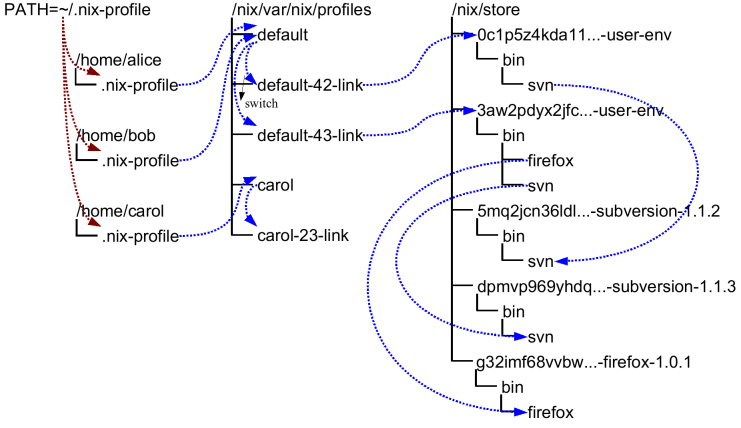
Profiles and user environments are Nix’s mechanism for implementing the ability to allow different users to have different configurations, and to do atomic upgrades and rollbacks. To understand how they work, it’s useful to know a bit about how Nix works. In Nix, packages are stored in unique locations in the Nix store (typically, /nix/store). For instance, a particular version of the Subversion package might be stored in a directory /nix/store/dpmvp969yhdqs7lm2r1a3gng7pyq6vy4-subversion-1.1.3/, while another version might be stored in /nix/store/5mq2jcn36ldlmh93yj1n8s9c95pj7c5s-subversion-1.1.2. The long strings prefixed to the directory names are cryptographic hashes[1] of all inputs involved in building the package — sources, dependencies, compiler flags, and so on. So if two packages differ in any way, they end up in different locations in the file system, so they don’t interfere with each other. Figure 10.1, “User environments” shows a part of a typical Nix store.
Figure 10.1. User environments
Of course, you wouldn’t want to type
$ /nix/store/dpmvp969yhdq...-subversion-1.1.3/bin/svnevery time you want to run Subversion. Of course we could set up the PATH environment variable to include the bin directory of every package we want to use, but this is not very convenient since changing PATH doesn’t take effect for already existing processes. The solution Nix uses is to create directory trees of symlinks to activated packages. These are called user environments and they are packages themselves (though automatically generated by nix-env), so they too reside in the Nix store. For instance, in Figure 10.1, “User environments” the user environment /nix/store/0c1p5z4kda11...-user-env contains a symlink to just Subversion 1.1.2 (arrows in the figure indicate symlinks). This would be what we would obtain if we had done
$ nix-env -i subversionon a set of Nix expressions that contained Subversion 1.1.2.
This doesn’t in itself solve the problem, of course; you wouldn’t want to type /nix/store/0c1p5z4kda11...-user-env/bin/svn either. That’s why there are symlinks outside of the store that point to the user environments in the store; for instance, the symlinks default-42-link and default-43-link in the example. These are called generations since every time you perform a nix-env operation, a new user environment is generated based on the current one. For instance, generation 43 was created from generation 42 when we did
$ nix-env -i subversion firefoxon a set of Nix expressions that contained Firefox and a new version of Subversion.
Generations are grouped together into profiles so that different users don’t interfere with each other if they don’t want to. For example:
$ ls -l /nix/var/nix/profiles/

  ...

  lrwxrwxrwx  1 eelco ... default-42-link -> /nix/store/0c1p5z4kda11...-user-env

  lrwxrwxrwx  1 eelco ... default-43-link -> /nix/store/3aw2pdyx2jfc...-user-env

  lrwxrwxrwx  1 eelco ... default -> default-43-link
This shows a profile called default. The file default itself is actually a symlink that points to the current generation. When we do a nix-env operation, a new user environment and generation link are created based on the current one, and finally the default symlink is made to point at the new generation. This last step is atomic on Unix, which explains how we can do atomic upgrades. (Note that the building/installing of new packages doesn’t interfere in any way with old packages, since they are stored in different locations in the Nix store.)

Garbage collection
In the opening of the Nix Manual - Garbage Collection chapter:
nix-env operations such as upgrades (-u) and uninstall (-e) never actually delete packages from the system. All they do (as shown above) is to create a new user environment that no longer contains symlinks to the “deleted” packages.
Of course, since disk space is not infinite, unused packages should be removed at some point. You can do this by running the Nix garbage collector. It will remove from the Nix store any package not used (directly or indirectly) by any generation of any profile.
Note however that as long as old generations reference a package, it will not be deleted. After all, we wouldn’t be able to do a rollback otherwise. So in order for garbage collection to be effective, you should also delete (some) old generations. Of course, this should only be done if you are certain that you will not need to roll back.
Command reference section
Main commands
nix-env
In the Nix Manual - Main Commands chapter:
nix-env — manipulate or query Nix user environments
...
Description
The command nix-env is used to manipulate Nix user environments. User environments are sets of software packages available to a user at some point in time. In other words, they are a synthesised view of the programs available in the Nix store. There may be many user environments: different users can have different environments, and individual users can switch between different environments.
...
Common options
...
--profile / -p pathSpecifies the profile to be used by those operations that operate on a profile (designated below as the active profile). A profile is a sequence of user environments called generations, one of which is the current generation....
Files
...
~/.nix-profileA symbolic link to the user's current profile. By default, this symlink points to prefix/var/nix/profiles/default. The PATH environment variable should include ~/.nix-profile/bin for the user environment to be visible to the user.Operation --install
Synopsis
nix-env { --install | -i } [ { --prebuilt-only | -b } ] [ { --attr | -A } ] [--from-expression] [-E] [--from-profile path] [ --preserve-installed | -P ] [ --remove-all | -r ] args...Description
The install operation creates a new user environment, based on the current generation of the active profile, to which a set of store paths described by args is added. The arguments args map to store paths in a number of possible ways...
...
You can force the installation of multiple derivations with the same name by being specific about the versions. For instance, nix-env -i gcc-3.3.6 gcc-4.1.1 will install both version of GCC (and will probably cause a user environment conflict!).
...
If --from-profile path is given, args is a set of names denoting installed store paths in the profile path. This is an easy way to copy user environment elements from one profile to another.
...
Operation --upgrade
Synopsis
nix-env { --upgrade | -u } [ { --prebuilt-only | -b } ] [ { --attr | -A } ] [--from-expression] [-E] [--from-profile path] [ --lt | --leq | --eq | --always ] args...Description
The upgrade operation creates a new user environment, based on the current generation of the active profile, in which all store paths are replaced for which there are newer versions in the set of paths described by args. Paths for which there are no newer versions are left untouched; this is not an error. It is also not an error if an element of args matches no installed derivations.
...
Operation --uninstall
Synopsis
nix-env { --uninstall | -e } drvnames...Description
The uninstall operation creates a new user environment, based on the current generation of the active profile, from which the store paths designated by the symbolic names names are removed.
...
Operation --set-flag
Synopsis
nix-env --set-flag name value drvnames...Description
The --set-flag operation allows meta attributes of installed packages to be modified. There are several attributes that can be usefully modified, because they affect the behaviour of nix-env or the user environment build script:
- priority can be changed to resolve filename clashes. The user environment build script uses the meta.priority attribute of derivations to resolve filename collisions between packages. Lower priority values denote a higher priority. For instance, the GCC wrapper package and the Binutils package in Nixpkgs both have a file bin/ld, so previously if you tried to install both you would get a collision. Now, on the other hand, the GCC wrapper declares a higher priority than Binutils, so the former’s bin/ld is symlinked in the user environment.
...
Operation --switch-generation
Synopsis
nix-env { --switch-generation | -G } {generation}Description
This operation makes generation number generation the current generation of the active profile. That is, if the profile is the path to the active profile, then the symlink profile is made to point to profile-generation-link, which is in turn a symlink to the actual user environment in the Nix store.
...
Operation --query
Synopsis
nix-store { --query | -q } { --outputs | --requisites | -R | --references | --referrers | --referrers-closure | --deriver | -d | --graph | --tree | --binding name | -b name | --hash | --size | --roots } [--use-output] [-u] [--force-realise] [-f] paths......
Examples
Print the closure (runtime dependencies) of the svn program in the current user environment:
$ nix-store -qR $(which svn)

/nix/store/5mbglq5ldqld8sj57273aljwkfvj22mc-subversion-1.1.4

/nix/store/9lz9yc6zgmc0vlqmn2ipcpkjlmbi51vv-glibc-2.3.4
...
Make a picture of the runtime dependency graph of the current user environment:
$ nix-store -q --graph ~/.nix-profile | dot -Tps > graph.ps

$ gv graph.ps
nix-copy-closure
In the Nix Manual - Main Commands chapter:
Name
nix-copy-closure - copy a closure to or from a remote machine via SSH
Synopsis
nix-copy-closure [ --to | --from ] [--gzip] [--include-outputs] [ --use-substitutes | -s ] [-v] user@machine paths...
Examples
...
Copy Subversion from a remote machine and then install it into a user environment:
$ nix-copy-closure --from alice@itchy.labs \

    /nix/store/0dj0503hjxy5mbwlafv1rsbdiyx1gkdy-subversion-1.4.4

$ nix-env -i /nix/store/0dj0503hjxy5mbwlafv1rsbdiyx1gkdy-subversion-1.4.4
Files
nix.conf
In the Nix Manual - Files chapter:
Name
nix.conf - Nix configuration file
Description
Nix reads settings from two configuration files:
- The system-wide configuration file sysconfdir/nix/nix.conf (i.e. /etc/nix/nix.conf on most systems), or $NIX_CONF_DIR/nix.conf if NIX_CONF_DIR is set.
- The user configuration file $XDG_CONFIG_HOME/nix/nix.conf, or ~/.config/nix/nix.conf if XDG_CONFIG_HOME is not set.
The configuration files consist of name = value pairs, one per line. Other files can be included with a line like include path, where path is interpreted relative to the current conf file and a missing file is an error unless !include is used instead. Comments start with a # character. Here is an example configuration file:
keep-outputs = true       # Nice for developers

keep-derivations = true   # Idem

You can override settings on the command line using the --option flag, e.g. --option keep-outputs false.
The following settings are currently available:
...
keep-env-derivationsIf false (default), derivations are not stored in Nix user environments. That is, the derivations of any build-time-only dependencies may be garbage-collected.If true, when you add a Nix derivation to a user environment, the path of the derivation is stored in the user environment. Thus, the derivation will not be garbage-collected until the user environment generation is deleted (nix-env --delete-generations). To prevent build-time-only dependencies from being collected, you should also turn on keep-outputs.
The difference between this option and keep-derivations is that this one is “sticky”: it applies to any user environment created while this option was enabled, while keep-derivations only applies at the moment the garbage collector is run.
Appendix A. Glossary
In the Nix Manual - Appendix A. Glossary:
user environmentAn automatically generated store object that consists of a set of symlinks to “active” applications, i.e., other store paths. These are generated automatically by nix-env. See Chapter 10, Profiles.
profileA symlink to the current user environment of a user, e.g., /nix/var/nix/profiles/default.